Wie lade ich von MyFlixerz.to herunter?

MyFlixerz.to ist eine beliebte, kostenlose Streaming-Website mit einer großen Auswahl an Filmen, Serien, Anime und Dokumentationen. Dank der umfangreichen Bibliothek und der benutzerfreundlichen Oberfläche ist sie eine beliebte Anlaufstelle für alle, die online Unterhaltung genießen möchten, ohne ein Abonnement abzuschließen. Ob aktueller Blockbuster, Filmklassiker oder die neueste TV-Folge – MyFlixerz bietet oft eine große Auswahl.
Streaming ist zwar praktisch, aber nicht immer die beste Lösung. Internetverbindungen können langsam oder unzuverlässig sein, und vielleicht möchten Sie Ihre Lieblingsfilme unterwegs oder an Orten ohne WLAN ansehen. Das Herunterladen von Videos zur Offline-Wiedergabe löst diese Probleme, denn so können Sie Ihre Inhalte jederzeit ohne Pufferung oder Unterbrechungen genießen.
In diesem Leitfaden erklären wir, ob MyFlixerz.to noch funktioniert, stellen kurz die alternativen Domains vor und besprechen verschiedene Methoden zum Herunterladen von MyFlixerz-Filmen.
1. Funktioniert MyFlixerz.to noch?
Ja, MyFlixerz.to ist in vielen Regionen weiterhin zugänglich, die Verfügbarkeit ist jedoch nicht immer gewährleistet. Wie viele kostenlose Streaming-Websites unterliegt auch diese Plattform gelegentlich Domainänderungen, vorübergehenden Ausfällen oder regionalen Beschränkungen aufgrund von Urheberrechtsverletzungen oder Hosting-Problemen.
Wenn die Hauptdomain nicht erreichbar ist, greifen die Nutzer oft auf eine ihrer Spiegel-Websites zurück, die in der Regel ähnliche Inhalte und Funktionen bieten.
Zu den häufig verwendeten alternativen Domains für MyFlixerz gehören:
- myflixerz.day
- myflixerz.show
- myflixerhd.online
- myflixer3.com
2. Wie lade ich Filme von MyFlixerz herunter?
Da MyFlixerz keine integrierte Download-Funktion bietet, benötigen Sie eine andere Methode, um Videos für die Offline-Wiedergabe zu speichern. Hier sind die gängigsten Vorgehensweisen.
Methode 1: Verwenden Sie einen Browser-Video-Downloader
Viele Browsererweiterungen können auf einer Webseite abgespielte Videostreams erkennen und direkt herunterladen.
So wenden Sie diese Methode an:
- Installieren Sie eine vertrauenswürdige Video-Downloader-Erweiterung wie Video Downloader VeeVee für Ihren Browser.
- Öffnen Sie MyFlixerz, spielen Sie den Film ab, den Sie speichern möchten, klicken Sie auf die Erweiterung und warten Sie, bis der Videostream erkannt wird.
- Wählen Sie Ihre bevorzugte Auflösung und laden Sie den Film von MyFlixerz herunter.
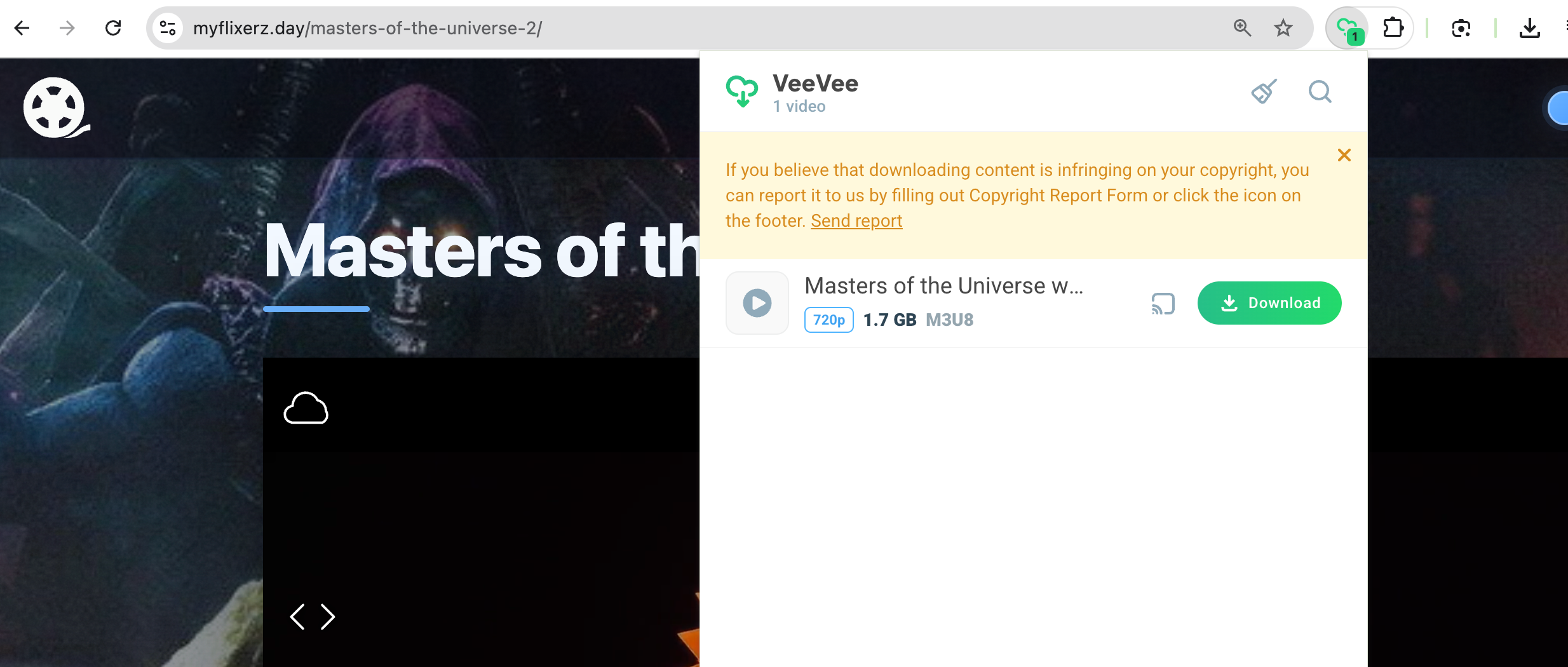
Diese Methode ist schnell und einfach, funktioniert aber nicht auf allen Streaming-Websites. Einige Player verwenden verschlüsselte Videostreams, die Browsererweiterungen nicht erkennen können.
Methode 2: Versuchen Sie es mit einem Online-Video-Downloader.
Mehrere Online-Dienste geben an, das Herunterladen von Videos von Streaming-Websites zu unterstützen.
Typischerweise läuft der Prozess wie folgt ab:
- Kopieren Sie die URL der Filmseite und fügen Sie sie in einen Online-Downloader wie Yt1Save ein.
- Die Website soll den Link analysieren und das verfügbare MyFlixerz-Video herunterladen.
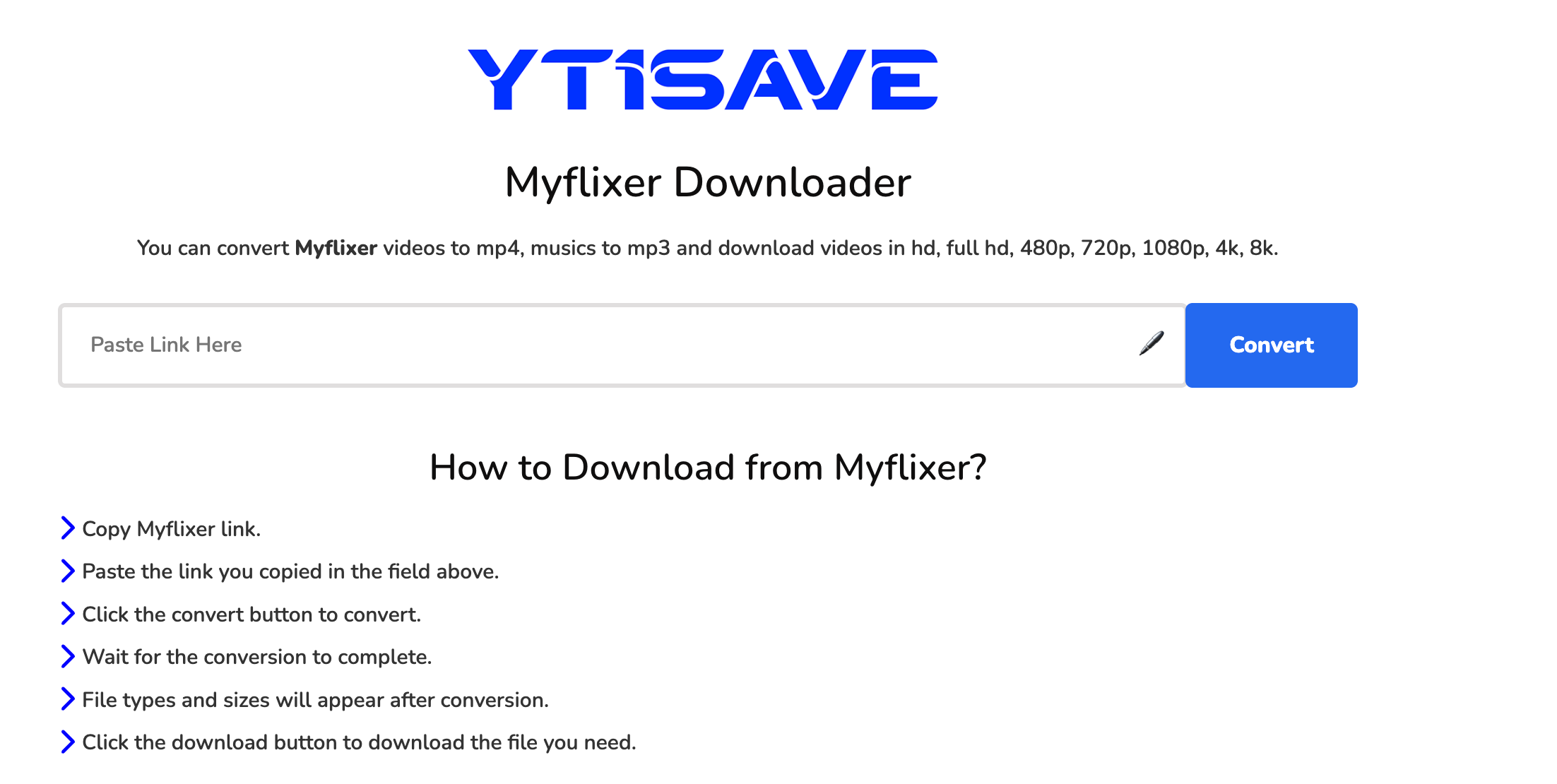
Obwohl keine Softwareinstallation erforderlich ist, weisen Online-Downloader oft Einschränkungen auf. Sie unterstützen MyFlixerz möglicherweise nicht, bieten nur Downloads in niedriger Auflösung an oder zeigen übermäßige Werbung an.
Methode 3: Bildschirmaufnahme
Falls ein direkter Download nicht möglich ist, kann das Video während der Wiedergabe per Bildschirmaufnahme aufgezeichnet werden.
Einfach:
- Öffne den Film im Vollbildmodus auf der MyFlixerz-Seite.
- Starten Sie Ihren bevorzugten Bildschirmrekorder, z. B. Swyshare Recordit , Aufnahmeeinstellungen festlegen und Aufnahme starten.
- Spielen Sie den Film von Anfang bis Ende ab und speichern Sie anschließend die Aufnahme.
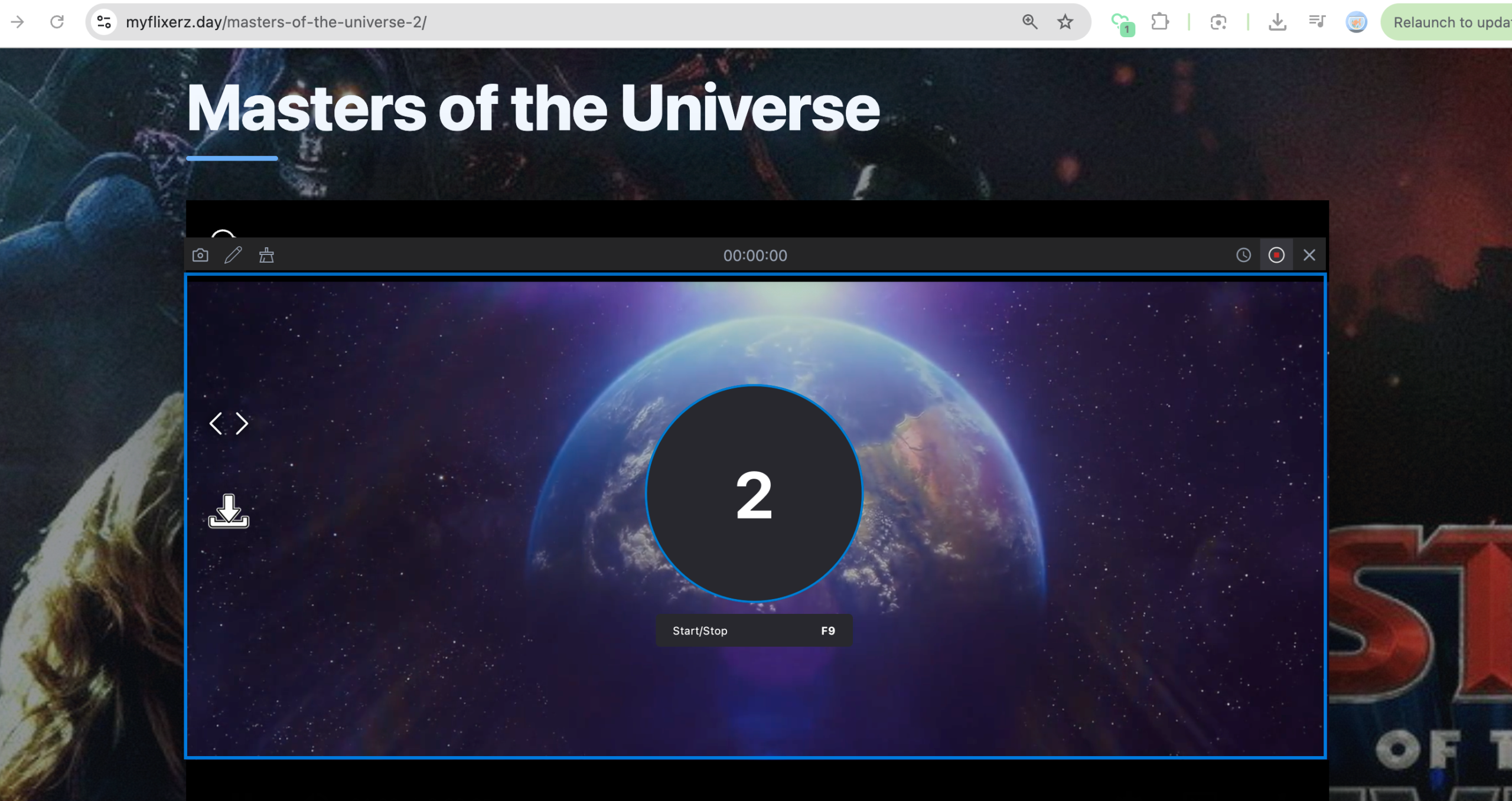
Diese Methode funktioniert zwar in fast jeder Situation, dauert aber genauso lange wie der Film selbst und kann zu größeren Dateigrößen oder einer leicht reduzierten Videoqualität führen.
3. Erweiterter Massen-Download von MyFlixerz-Filmen mit Meget
Wenn Sie regelmäßig Filme oder Fernsehserien herunterladen, ist die Verwendung eines speziellen Downloaders eine wesentlich effizientere Lösung als Browsererweiterungen oder Bildschirmaufnahmen. Sehr ist darauf ausgelegt, Streaming-Videos von zahlreichen Websites schnell, zuverlässig und in hoher Qualität herunterzuladen.
Hauptmerkmale von Much:
- Unterstützt über 10.000 Video-Hosting-Websites, darunter MyFlixerz.
- Filme in HD oder höherer Qualität herunterladen, sofern verfügbar.
- Mehrere Filme oder TV-Episoden gleichzeitig herunterladen.
- Speichern Sie Videos in originalen und gängigen Formaten wie MP4.
- Integrierter Browser zum Zugriff auf eingebettete und private Videos.
Schritte zum Herunterladen von MyFlixerz-Filmen mit Meget:
- Laden Sie Meget herunter und installieren Sie es auf Ihrem Windows- oder macOS-Computer.
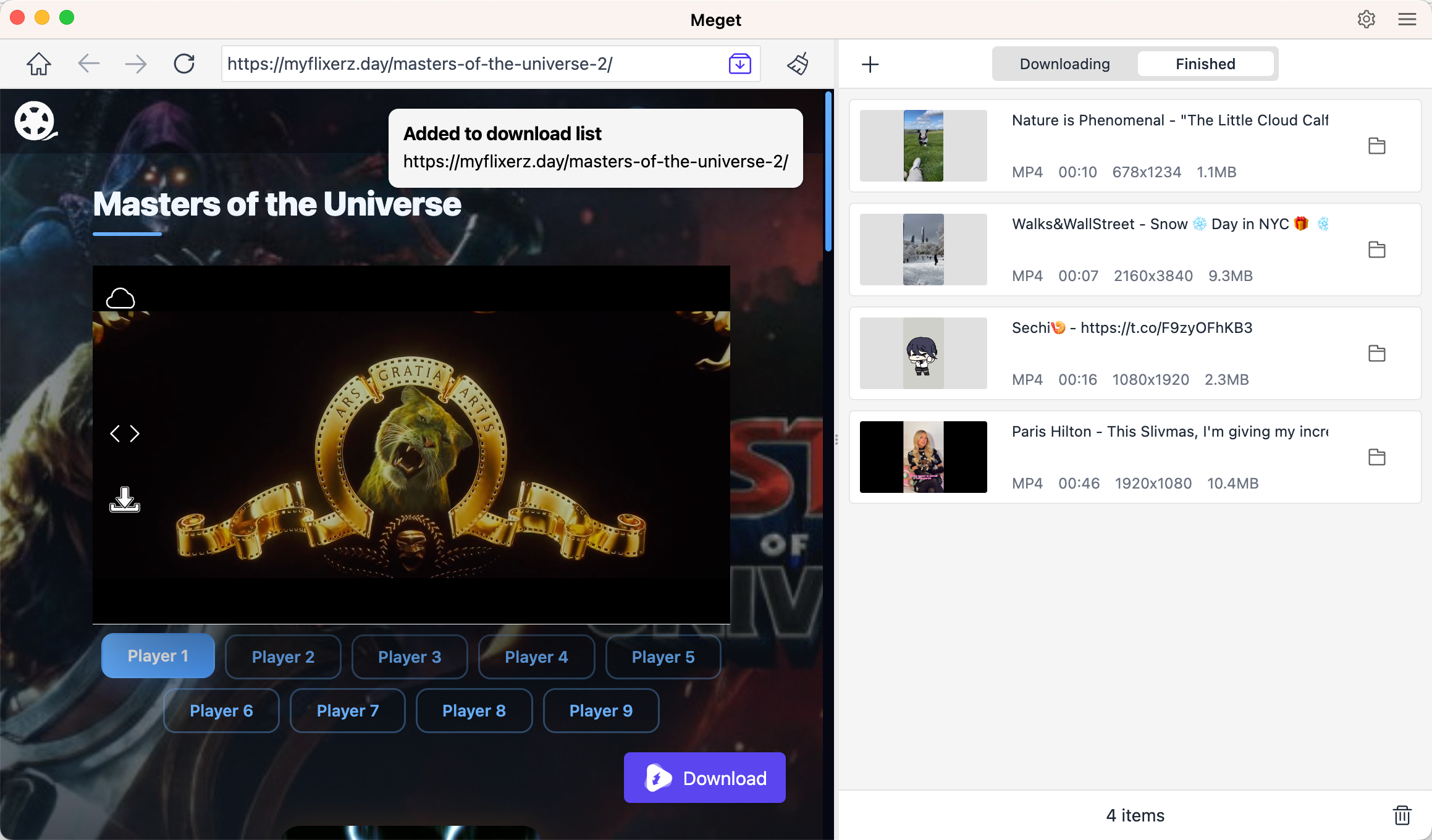
- Öffnen Sie Meget und navigieren Sie dann mit dem integrierten Browser zu MyFlixerz.to oder einer der funktionierenden Spiegel-Websites.
- Suchen Sie den Film oder die Fernsehfolge, die Sie speichern möchten, und öffnen Sie die Wiedergabeseite.
- Starten Sie die Videowiedergabe für einige Sekunden, damit Meget die Streaming-Quelle erkennen kann.
- Klicken Sie auf das Herunterladen Klicken Sie auf die Schaltfläche, wählen Sie Ihre bevorzugten Qualitäts- und Ausgabeeinstellungen und starten Sie den Download.
- Stöbern Sie weiter und fügen Sie weitere Filme oder Episoden zur Download-Warteschlange hinzu.
4. Fazit
Obwohl MyFlixerz.to keine offizielle Download-Funktion bietet, gibt es dennoch verschiedene Möglichkeiten, Filme und Serien für die Offline-Wiedergabe zu speichern. Browser-Erweiterungen, Online-Downloader und Bildschirmaufzeichnungsprogramme funktionieren zwar, weisen aber oft Einschränkungen wie inkonsistente Kompatibilität, geringere Leistung oder niedrigere Videoqualität auf.
Wenn Sie häufig Streaming-Inhalte herunterladen, ist Meget die praktischste Lösung. Dank der Unterstützung für hochwertige Downloads, Stapelverarbeitung, hohe Downloadgeschwindigkeiten und der breiten Kompatibilität mit Streaming-Websites eignet es sich hervorragend zum Aufbau einer Offline-Filmbibliothek. Egal, ob Sie einen Film oder Dutzende von Episoden herunterladen, Sehr bietet ein schnelleres, einfacheres und zuverlässigeres Download-Erlebnis und ist daher die empfohlene Wahl für MyFlixerz-Nutzer.
- GenYouTube im Überblick: Ein vollständiger Leitfaden zu Funktionen und Nutzung
- Tuberipper-Test: Lohnt sich die Nutzung?
- Wie behebt man das Problem, dass der 4K-Video-Downloader kein gültiges Format findet?
- Wie kann man das Problem beheben, dass der 4K-Downloader nur 10 Sekunden lädt?
- Die ultimative Liste der besten XDownloader zum Herunterladen von X-Videos
- Wie kann ich SaveFree verwenden, um Instagram-Videos und -Fotos herunterzuladen?
- GenYouTube im Überblick: Ein vollständiger Leitfaden zu Funktionen und Nutzung
- Tuberipper-Test: Lohnt sich die Nutzung?
- Wie behebt man das Problem, dass der 4K-Video-Downloader kein gültiges Format findet?
- Wie kann man das Problem beheben, dass der 4K-Downloader nur 10 Sekunden lädt?
- Die ultimative Liste der besten XDownloader zum Herunterladen von X-Videos
- Wie kann ich SaveFree verwenden, um Instagram-Videos und -Fotos herunterzuladen?
- Storyblocks Video Downloader im Test: Welche Methode funktioniert am besten?